For current and upcoming motherboards, the PGA package is being replaced by the LGA (Land Grid Array) package. With a LGA the pins are on the socket and they make contact with gold-plated copper pads on the processor.
Welcome to Bucaro TecHelp!

Welcome to Bucaro TecHelp!
Maintain Your Computer and Use it More Effectively
to Design a Web Site and Make Money on the Web

[About BTH]  [User Agreement]  [Privacy Policy]  [Site Map]  [Contact Form]  [Advertise on BTH]  [News Feed]

Google
Web
This Site

CPU Sockets Roundup

A CPU socket is used to connect a computer's CPU (Central Processing Unit) to its motherboard. Modern CPUs use the PGA (Pin Grid Array) package. With a PGA, the underside of the processor is covered with an array of metal pins. To install a CPU, the pins are inserted into a ZIF (Zero Insertion Force) socket mounted on the motherboard.

A ZIF socket has a lever to open the metal pin contacts in the socket so that the processor can be dropped into place without using force. After the processor is dropped into position, the lever is used to close the socket, creating good electrical contact between the PGA pins and the socket.

The Slot Package

For a short time, processor manufacturer's found that a socket could not handle the heat generated by the processor, nor did it provide enough real estate for the L2 cache size desired. They began using a slot, similar to an expansion card slot, rather than a socket, to mount their CPUs.
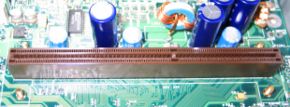
Slot 1 | image source: Wikipedia

Intel used "Slot 1" to mount their Celeron and Pentium II processors, and "Slot 2" to mount their Pentium II and Pentium III processors. AMD used "Slot A" to mount their Athlon processors. These "Slot" processors tended to jiggle loose, especially during shipping. Processor manufacturer's soon returned to using a socket to mount the CPU.

The Socket Package
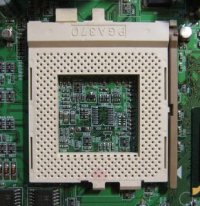
Socket 370 | image source: Wikipedia

Intel replaced the "Slot" CPU interface with "Socket 370" for their Celeron and Pentium III processors. The "370" refers to the number of holes in the socket for CPU pins.
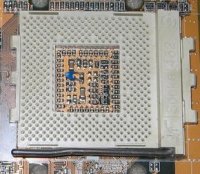
Slot A | image source: Wikipedia

AMD replaced "Slot A" with "Socket A" for their Duron, Sempron, and Athlon Thunderbird and XP/MP processors. "Socket A" is also known as "Socket 462" because, although there are 453 pins in the socket, nine pins are blocked to prevent insertion of Socket 370 CPUs.

Computer Sections

RSS Feed RSS Feed

Basic PC Anatomy
The Computers Back Connector Panel
How to Choose a Computer Case
PC Processor Fundamentals
AMD Sempron Processor
AMD Athlon 64 Processor
The AMD Athlon 64 X2 Processor
Intel Celeron D Processor
Intel's Core 2 processors
CPU Sockets Roundup
Understanding Computer Memory
Power Supply Form Factors
Hardware Resources Explained
Device Driver Basics
How Does a Laptop Battery Work?
Understanding Graphic Cards
A+ Certification Study Guide
Motherboard Basics
General Overview Of Motherboards
Motherboard Form Factors
Understanding Your PC's CPU Clock Speed and Front Side Bus
Understanding The Speed Of New Pci Express Data Bus
A Guide To Building Your Own PC
Intermediate PC Build-it-Yourself Guide
Tips and Techniques For Building Your Own PC
Build Your Own Computer
How to Build a Computer
Building Your Own PC! - The Motherboard is the Core of the PC
XFX nForce 680i LT SLI Socket 775 Barebone Kit
Mach Speed P4MSD-800 D2 Motherboard and Intel Pentium D 940 3.20GHz Processor Bundle
Asus M2N4-SLI Socket AM2 AMD Athlon 64 X2 4600+ Barebone Kit
Anatomy of a Hard Drive
Hard Disk Drive Basics
How a Hard Disks Work
The Master Boot Record (MBR)
PC Disk File Systems
Serial ATA Hard Drive
How is Data Written, Stored On, and Erased From Hard Disks?
Hard Disc Fundamentals
The Hard Disk Drive vs. The Solid State Disk
The Universal Serial Bus
IEEE-1394 FireWire
The Small Computer System Interface (SCSI)
Plug and Play Resource Allocation
Get Familiar With MSDOS.SYS
Become Familiar with the Windows Registry
Understanding the Software Layers of a Computer
Advanced Micro Devices (AMD) Chipsets
Intel Chipsets
VIA Chipsets
Basic Computer Thermodynamics
A Guide to Basic PC Cooling
How Does the CPU Cache Work?
How does a CD Burner work?
Understanding Your Motherboard
All About Your Computer's BIOS
Expansion Cards
Power and Your PC
Hard Drives - ATA versus SATA
Inkjet Printers
How a laser Printer Works

[Site User Agreement]  [Advertise on This site]  [Search This Site]  [Contact Form]
Copyright©2001-2007 Bucaro TecHelp P.O.Box 18952 Fountain Hills, AZ 85269

