How does a CD Burner work?
By Stephen Orgill
The CD burner or more commonly known as the CD writer has become a standard part of
the PC today. Its rare to see a PC without the capacity to create customized CD's.
Its takes only a few minutes these days to back up your work onto CD or create a
customized music from CD's you already own. But how does the CD writer actually work?
Well firstly we will need to take a closer look at how the standard CD reader works.
This will help us understand the burning process a little better.
The construction of a CD
The CD itself is made up of one continuous track about 0.5 microns wide and around
5km in length. This track is a small groove spiralling round and round the CD from
the centre to the edge. The materials used to make a CD are at the top we have the
label, then a layer of acrylic, a layer of aluminium ad finally a thicker layer of
plastic to protect the CD.
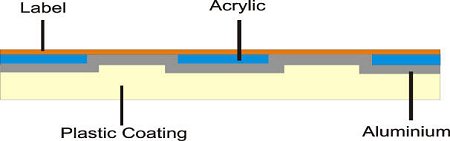
When manufacturing a production CD like what you buy in the shops, A heavy duty stamp
is used with microscopic bumps arranged as a single track of data. This is then stamped
on a disc of polycarbonate plastic. Then the Aluminium coating is applied for its
properties as a reflective surface. Acrylic is then applied for protection, and the
label is then placed on. This is obviously a large volume solution and the technique
is no good for home use.
Reading the CD
The process of reading the CD is a simple one although it needs to be very precise.
When a CD is burned it leaves a pattern of bumps and troughs. This is read as a
digital data stream. Each bump is read as a 0 and a trough or flat area is considered
to be a 1. (0's and 1's are the basis for digital data or binary code).
The bumps are read by an optical sensor, or more accurately the missing bumps are
read by the sensor. What actually happens is a low powered laser is projected at the
spinning CD, if there is no bump on the CD the light reflects back to the sensor and
a binary digit of 1 is recorded, if the laser hits a bump in the CD then the light is
reflected away from the sensor and so a 0 is recorded.
The sensor works in conjunction with the motor to work out how fast the CD is spinning
and therefore how many times a second it has to send the laser beam to the CD to
accurately work out the digital pattern on the CD's surface.
| 

 About BTH
 User Agreement
 Privacy
 Site Map
 Contact
 News Feeds


 RSS Feed
 Follow @Stephen Bucaro
 Windows Troubleshooting


