The expansion slots available on motherboards allow for a variety of upgrades in a computer system, but matching the appropriate card to an available slot needs to be addressed before making any purchasing decisions. The most common types of expansion cards for modern computer systems can be broken down into three formats: PCI, AGP, and PCI Express.
Welcome to Bucaro TecHelp!

Welcome to Bucaro TecHelp!
Maintain Your Computer and Use it More Effectively
to Design a Web Site and Make Money on the Web

[About BTH]  [User Agreement]  [Privacy Policy]  [Site Map]  [Contact Form]  [Advertise on BTH]  [News Feed]

Google
Web
This Site

Expansion Cards

Part 1: PCI

The expansion slots available on motherboards allow for a variety of upgrades in a computer system, but matching the appropriate card to an available slot needs to be addressed before making any purchasing decisions. The most common types of expansion cards for modern computer systems can be broken down into three formats: PCI, AGP, and PCI Express. Each of these formats will be addressed separately in this three part series of Tech Tips, starting with PCI.

The letters "PCI" stand for Peripheral Component Interconnect, and is the term used to describe a bus that connects components directly to the system's memory and to the system's processor through the "frontside bus." When discussing communications on a motherboard, the term "bus" has nothing to do with the big yellow thing that takes the kids to school. There may be several buses in a computer, and like the PCI bus, they are all responsible for managing the communication "traffic" from different devices to the processor.
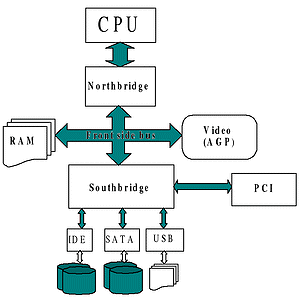
Frontside bus
image source: Wikipedia.org

The frontside bus is a high speed connection that manages the processor's communication with items such as hard drives, memory, and PCI devices, while not burdening the processor with all of the management responsibilities.

First developed by Intel in the early 1990s, PCI was spawned from even earlier (and slower) bus architectures such as ISA (Industry Standard Architecture) and VL-Bus (VESA Local), which were common back in the 1980s and 1990s.

The original specifications for the PCI Bus had a speed of 33 MHz, with a 32-bit bus width, and a maximum bandwidth of 132 MB per second. There have been a few revisions to the PCI standard which have significantly increased these specifications, taking it to 66 MHz, 64-bit, and 512 MB per second, respectively.

Computer Sections

RSS Feed RSS Feed

Basic PC Anatomy
The Computers Back Connector Panel
How to Choose a Computer Case
PC Processor Fundamentals
AMD Sempron Processor
AMD Athlon 64 Processor
The AMD Athlon 64 X2 Processor
Intel Celeron D Processor
Intel's Core 2 processors
CPU Sockets Roundup
Understanding Computer Memory
Power Supply Form Factors
Hardware Resources Explained
Device Driver Basics
How Does a Laptop Battery Work?
Understanding Graphic Cards
A+ Certification Study Guide
Motherboard Basics
General Overview Of Motherboards
Motherboard Form Factors
Understanding Your PC's CPU Clock Speed and Front Side Bus
Understanding The Speed Of New Pci Express Data Bus
A Guide To Building Your Own PC
Intermediate PC Build-it-Yourself Guide
Tips and Techniques For Building Your Own PC
Build Your Own Computer
How to Build a Computer
Building Your Own PC! - The Motherboard is the Core of the PC
XFX nForce 680i LT SLI Socket 775 Barebone Kit
Mach Speed P4MSD-800 D2 Motherboard and Intel Pentium D 940 3.20GHz Processor Bundle
Asus M2N4-SLI Socket AM2 AMD Athlon 64 X2 4600+ Barebone Kit
Anatomy of a Hard Drive
Hard Disk Drive Basics
How a Hard Disks Work
The Master Boot Record (MBR)
PC Disk File Systems
Serial ATA Hard Drive
How is Data Written, Stored On, and Erased From Hard Disks?
Hard Disc Fundamentals
The Hard Disk Drive vs. The Solid State Disk
The Universal Serial Bus
IEEE-1394 FireWire
The Small Computer System Interface (SCSI)
Plug and Play Resource Allocation
Get Familiar With MSDOS.SYS
Become Familiar with the Windows Registry
Understanding the Software Layers of a Computer
Advanced Micro Devices (AMD) Chipsets
Intel Chipsets
VIA Chipsets
Basic Computer Thermodynamics
A Guide to Basic PC Cooling
How Does the CPU Cache Work?
How does a CD Burner work?
Understanding Your Motherboard
All About Your Computer's BIOS
Expansion Cards
Power and Your PC
Hard Drives - ATA versus SATA
Inkjet Printers
How a laser Printer Works

[Site User Agreement]  [Advertise on This site]  [Search This Site]  [Contact Form]
Copyright©2001-2007 Bucaro TecHelp P.O.Box 18952 Fountain Hills, AZ 85269

