Anatomy of a Hard Drive
By Stephen Bucaro
The operation of a computer requires some means to store programs and data.
The programs and data could be stored in some type of semiconductor memory.
RAM (Random Access Memory) is a type of semiconductor storage that loses
its data when the power is removed. ROM (Read Only Memory) doesn't lose its
data when power is removed, but data can be written to a ROM only once.
Flash memory is a special kind of semiconductor that doesn't lose its data
when power is removed, and it can be read and written to many times. but
flash memory is expensive. A hard drive is basically a low-cost mechanical
means of storing a large amount of data that isn't lost when the power is
removed, and can be read and written many times.
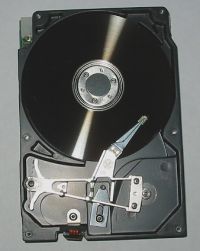
A hard drive contains a spinning metal disk. The surfaces of the disk have
a magnetizable coating. An actuator arm with a read/write head on its end is
passed over the surface of the spinning disk. The hard disk drive contains
circuitry to control the position of the actuator arm and provide a signal
to the read/write head.
The disk spins at 7200 rpm. When the disk is spinning, the read/write head
floats on a thin layer of air slightly above the surface of the disk. The
space between a read/write head and the surface of the disk is around 50
nanometers, about 1/2000 the diameter of a human hair.
• You should never open a hard drive's sealed case because a speck
of dust is bigger than the gap between the disk and the read/write head. If dust
enters the drive, it can have catastrophic results.
To store a binary 1, the read/write head magnetizes a tiny area of the disk's
surface. To store a binary 0, the read/write head magnetizes an area with the
opposite polarity. To read data, the read/write head detects the polarity of
the magnetized areas.
In the early days of computers, the electronic control circuitry was on a
separate circuit board that was plugged into an expansion slot on the computer's
motherboard. Today, hard drives have Integrated Drive Electronics (IDE). The
control circuitry is mounted on the hard drive.
The magnetized areas containing the data follow concentric circles around
the disk called "tracks". The tracks are divided into pie shaped "sectors".
Tracks closer to the center of the disk are smaller than tracks closer to
the outside edge. However, every sector still contains 512 bytes of data.
This is accomplished using a method called "precompensation".
A hard drive uses both sides of the disk, with an actuator arm and read/write
head for each side. Large capacity hard drives may contain as many as eight
disks, referred to as "platters", with a total of 16 read/write heads.
Early hard drives used a stepping motor to position the actuator arm so
that the read/write head was over the desired track. When the hard drive
was turned off, the read/write heads moved to a special location on the disk
called the "parking" area. In a sudden power failure, the stepping motor
couldn't park the heads. The heads would "crash" into the disk, resulting in
a catastrophic failure.
| 

 About BTH
 User Agreement
 Privacy
 Site Map
 Contact
 News Feeds


 RSS Feed
 Follow @Stephen Bucaro
 Windows Troubleshooting


